CLOUD-NATIVE ENGINEERING DESIGN

Cloud-native Platform for
Engineering Design

Solid modeling, volumetric lattice design and early finite-element validation in a single secure cloud workspace — no installs, no file shuffling, no exporting geometry between disconnected tools.

TRY FREE FOR 15 DAYS PAY FOR CAD THE WAY YOU USE IT.

The real product, not a cut-down demo — All add-ons included. FEA on request. No credit card required.

Design

CAD

Parametric & sketch-constraint shapes, top-down assemblies, sub-division organic modeling and PMI

◈
Validate

FEA

Design-time finite-element checks that catch problems while they are still cheap to fix.

◉
Optimize

Volumetric Lattice

GPU-driven volumetric lattice design for advanced additive manufacturing optimizations

⬡
Share

Collaboration without the friction

Share models, exchange feedback, attach manufacturing files and communicate design intent through integrated 3D and PMI sharing.

Native Cloud

No files to lose, no software to maintain. Your entire design lives in a managed, always-available cloud workspace.

☁
CLOUD NATIVE

Runs in any modern browser — nothing to install, patch or update. Ever.

▦
DATABASE STORAGE

Every design lives in a managed database which is secure and backed up. No files, no folders. Clone a design when you want to keep a version.

◫
PROJECT ORGANISATION

Instead of folders, you work in projects. One per client, one per job, however you split the work.

◈
REGIONAL HOSTING

Designs are stored on US cloud servers by default. Regional hosting on request.
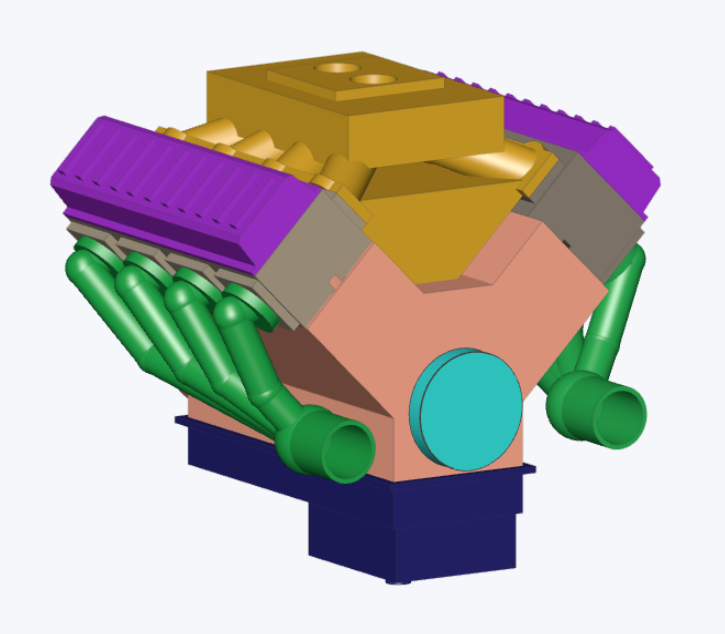
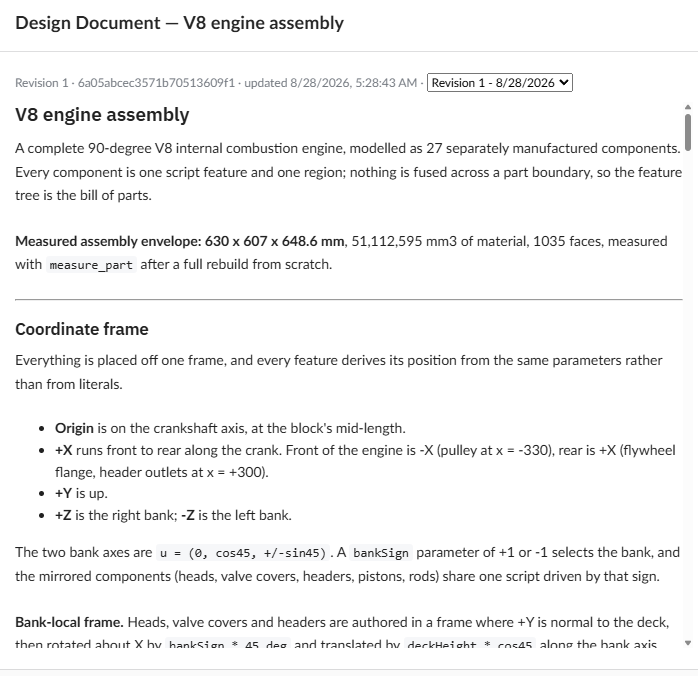
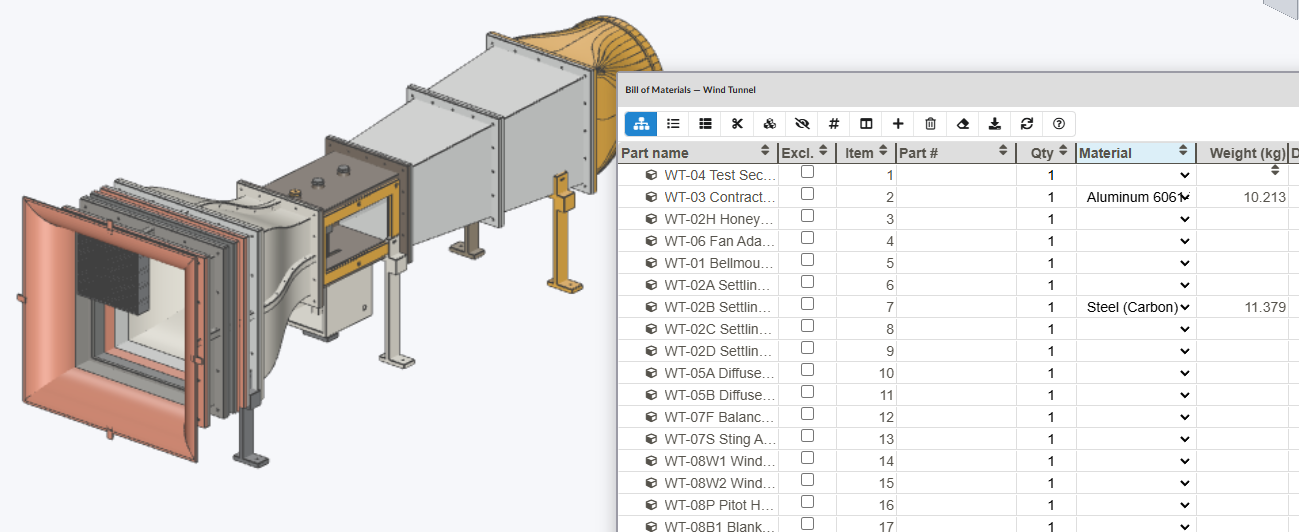
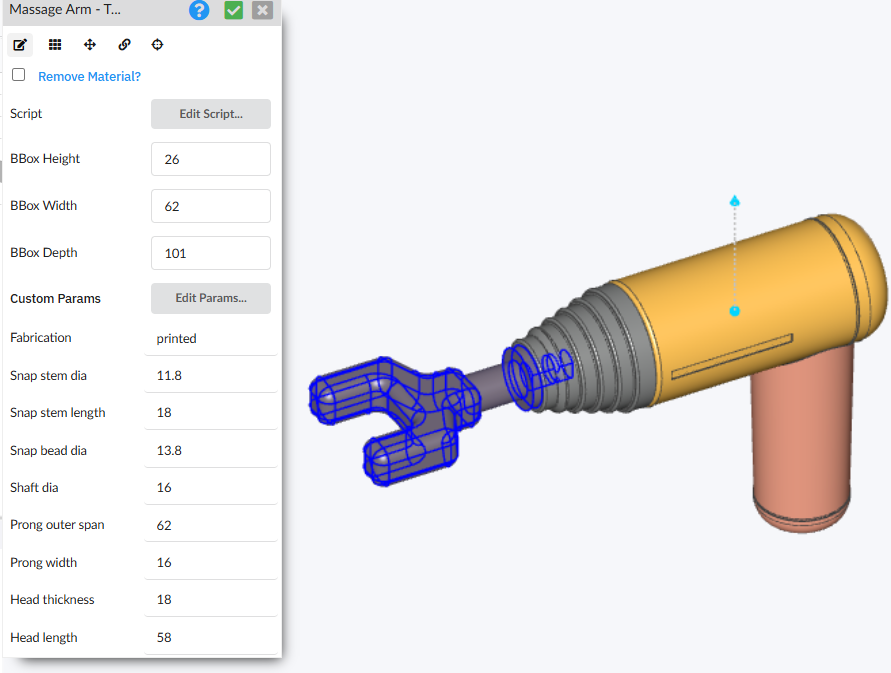
V8 engine assembly modelled in Imaginatix, each component a separate partDesign document generated for the V8 engine assembly, describing its coordinate frame and parametersWind tunnel assembly with its bill of materials open beside itMassage arm part with a panel of named custom parameters such as shaft diameter and prong span

A 27-component V8 engine — every component its own part, built from a described intent.

Setup takes a minute, and runs on the LLM subscription you already have.

Watch the Video: Recreate parametric design from a drawing
Beta

AI FEATURE GENERATION

Describe the part you want. Your assistant writes it as a parametric script in the design you have open.

Start from whatever you have
A written spec, an engineering drawing, a conceptual sketch or a product image. Anything that describes the part is a starting point — you skip the blank page and go straight to refining.
Generate geometry from a description
Say what the part does and what it fits. You get a working part with named parameters, built as one part with multiple bodies.
Split it into an assembly
Explode the bodies into separate parts and refine each on its own. Design-level parameters stay shared across them.
Edit the script directly
Change any parameter, rebuild, and the design updates.
Verified as it builds
The assistant measures what it produced against what you asked for and corrects the script when they disagree.
Learn More...

POWERFUL
CAD FEATURES

A complete parametric modeling environment — sketches, solids, surfaces and scripts and standard formats for data exchange built in.

Built on a commercial CAD geometric kernel, providing proven geometric modeling capabilities for precision solid and surface design.

Integrated assembly / part design
Parts and assemblies in one environment — no context switching.
Multi-body part design
Unified feature history.
Parametric shapes library
Interactive parametric shapes let you quickly adjust dimensions and establish precise geometric alignments.
Sub-division Modeling
Organic modelling fully integrated with feature history. Subdivision features are first-class citizens
Wide range of CAD tools
Sketches, Extrude, Revolve, Fillet, Chamfer, Loft, Sweep, Bridge, Wrap, Emboss, Deboss, Booleans, Face splits, Drafting, Patterns, Ribs, Thicken, SVG, and more.
Direct editing
Edit imported STEP parts with no history: resize holes, change fillets, push, move or delete faces — each edit kept as a feature.
Learn more →
Sheet metal
Flanges, hems, jogs and bends with real thickness and K-factor, then a laser-ready flat DXF with bend lines.
Learn more →
Data exchange
STEP, IGES and other CAD formats for import and export.
Measurement tools
Precise in-canvas measurement across geometry, edges, and assemblies.
Scripted shapes via JavaScript API
Author geometry creation using a full-fledged JS CAD API — create reusable components

IMAGINATIX
ADVANTAGE

High-performance and robust operations
A commercial-grade geometric kernel for complex fillets, shells and booleans, and advanced solid, sheet metal and surfacing operations.
Opens the files your suppliers send
Import STEP, IGES, Parasolid and ACIS files directly.
Your laptop isn't the limit
Geometry is computed on our servers, so a heavy rebuild doesn't need a workstation. Open the same design from any browser.
Never locked out of your designs
Switch add-ons on for a project and off when it ends. Between projects, a low-cost access plan keeps your projects and designs accessible and lets you download exported versions.
Data where your contract needs it
For GDPR or export-control requirements, we can deploy in your region, and one sign-in still connects your team and partners worldwide. Standard hosting is in the US.
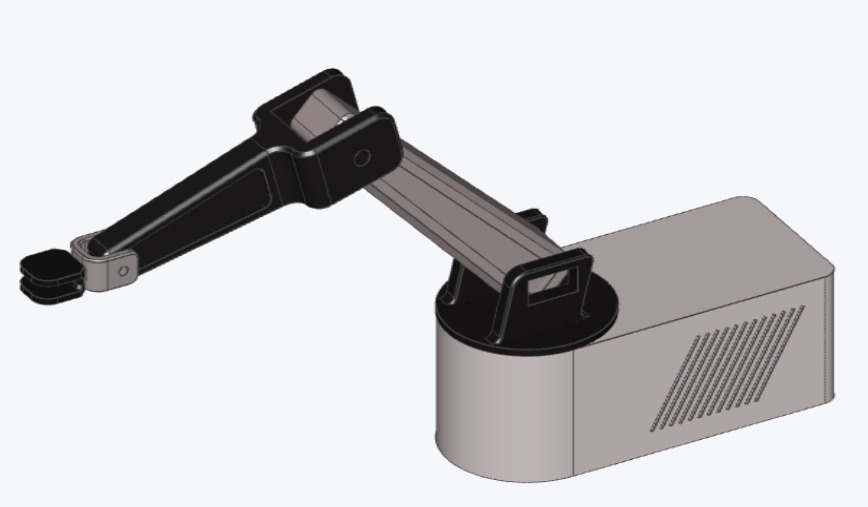
Robotic arm CAD assembly model

Unified Design Envronment

Design one or multiple parts and assemblies - all in a single workspace

Single environment for parts and assemblies
Design parts and sub-assemblues without switching between part and assembly modes
Top-down design with in-context assembly
Design parts in their real position relative to neighbours — full spatial context while you model.
Part Library
Design reusable parts, share it with others and use them across multiple designs

PCB ENCLOSURE
DESIGN

Fewer hand-offs between the board and the box, from first sketch to a fit that works.
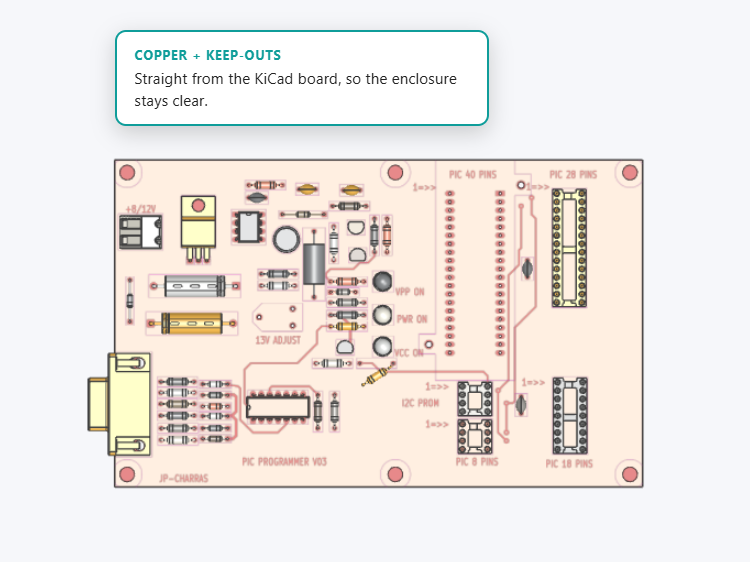
No guessing where copper runs
The KiCad board sits in your design with its copper and keep-outs showing, so clashes surface while you model, not at assembly.
No screenshots by email
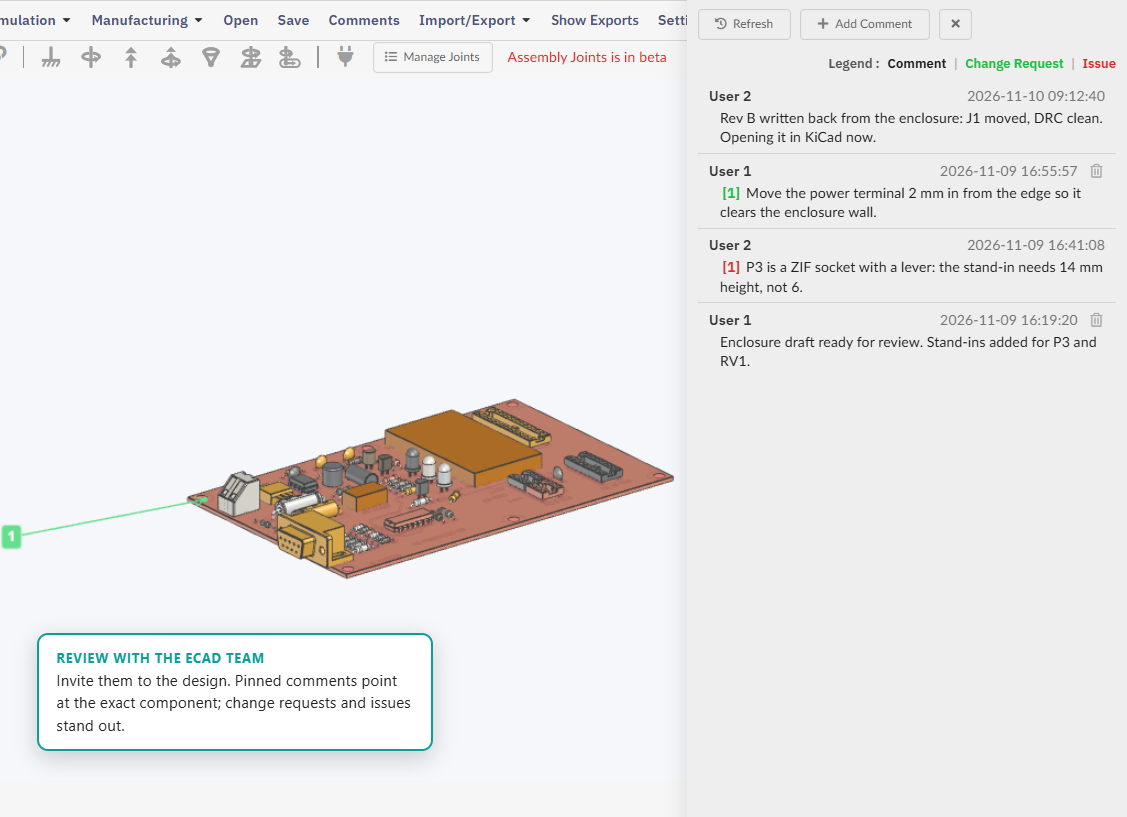
The ECAD engineer joins as a free viewer and comments right on the model.
No re-entering mechanical changes
Mounting holes, cut-outs, outline edits and component moves made for the enclosure go into the KiCad PCB layout as a new revision.
Learn more →
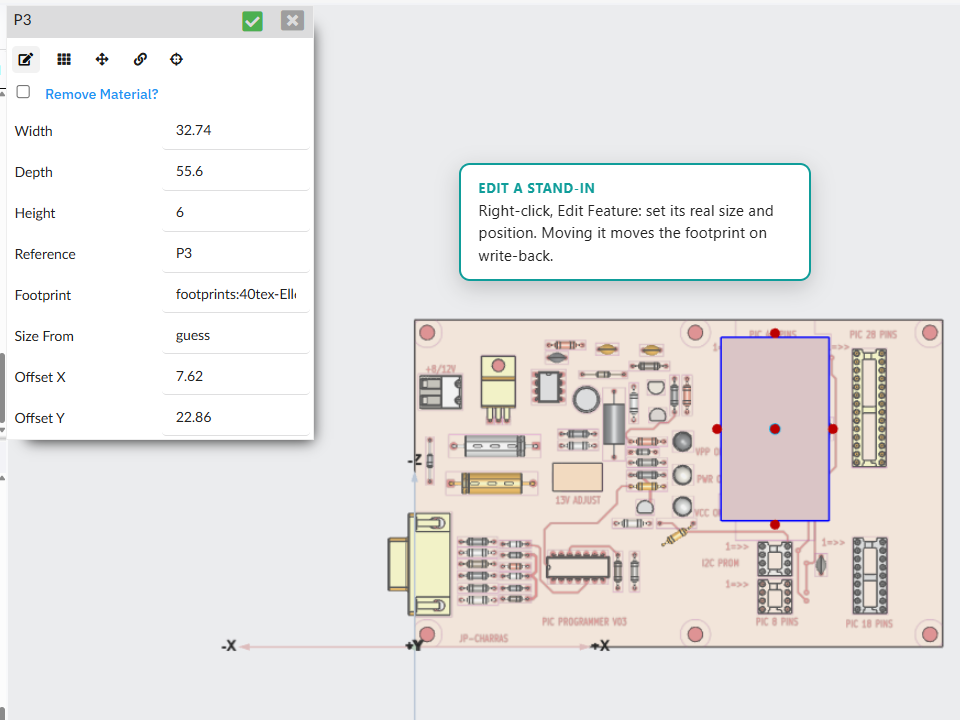
KiCad board with copper and keep-outs shownStand-in for a component without a 3D model, open in the feature editorBoard with a pinned comment and a review thread

Copper and keep-outs straight from the KiCad board.
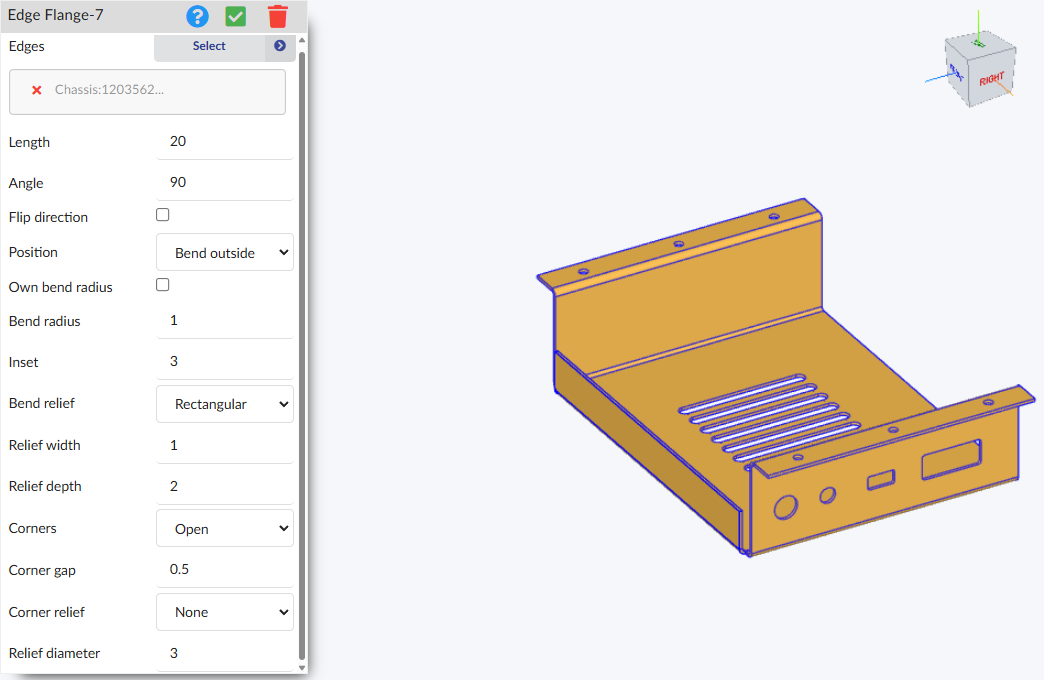
Edge flange open in the feature editor on a steel chassis
Edge flange: length, angle, relief and corners.
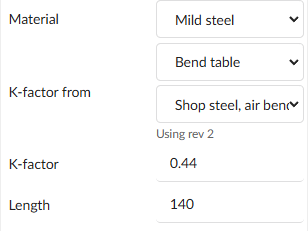
Base flange editor taking its K-factor from a shop bend table
K-factor from a shop bend table.
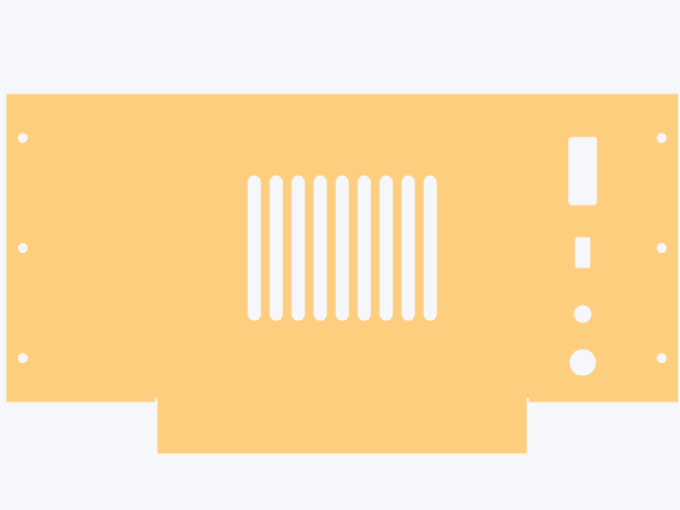
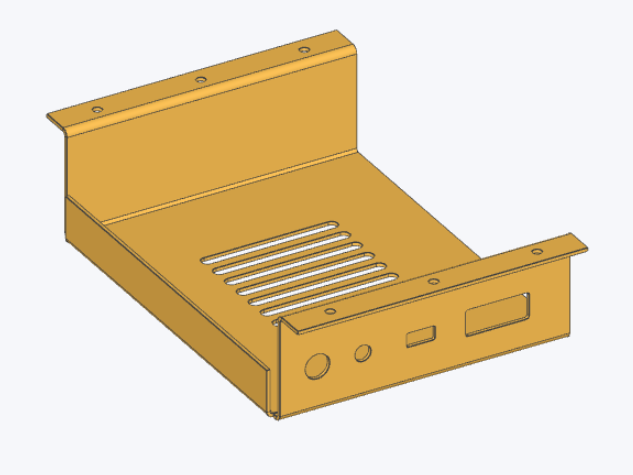
Flat blank of the chassis with vent slots, holes and connector cut-outs
The flat blank, ready for DXF.
Finished bent steel chassis with vents and connector cut-outs
The finished chassis.

SHEET METAL

Bend real parts with real thickness: flanges, hems, jogs and miters, with the K-factor taken from your shop's bend tables, then a flat blank and a DXF with bend lines for the laser.

Learn more →

GPU-POWERED
LATTICE DESIGN

The implicit volumetric kernel runs entirely in your browser — no geometry export, no waiting, no disconnected tools.
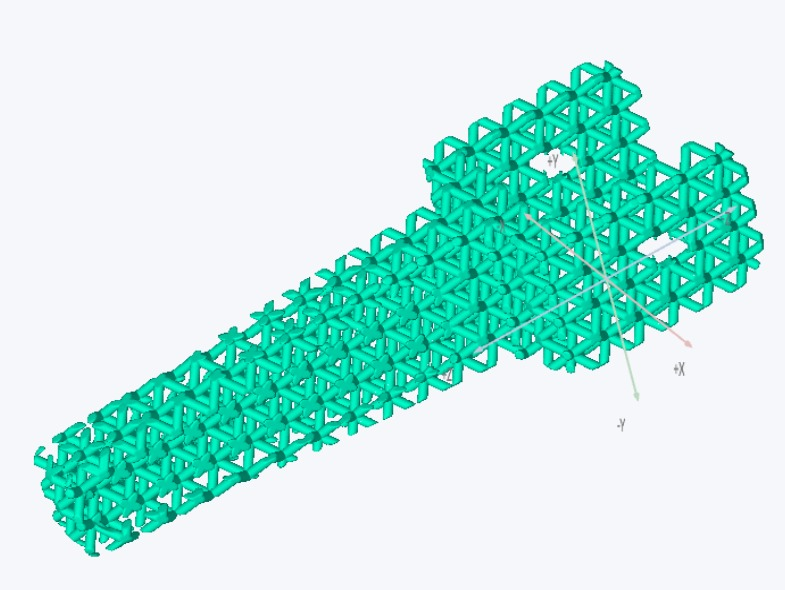
GPU-accelerated interactive design of complex lattice structures right in your browser
Create complex volumetric and surface lattices in real time. The implicit kernel handles intricate geometry instantly, in the browser.
Unified design environment
No constant import/export — switch seamlessly between parametric CAD and lattice tools in one fluid workflow.
Structural & thermal optimization
A wide library of lattice types to reduce weight, improve heat dissipation, or tune stiffness.
Variable density lattice structures
Go beyond uniform patterns. Use simulation results or CAD 'Influencer' regions to vary thickness and density exactly where needed.
Ready for Production
Export high-fidelity CAD designs with lattice structures to STL and 3MF for 3D printing.
Volumetric lattice CAD model
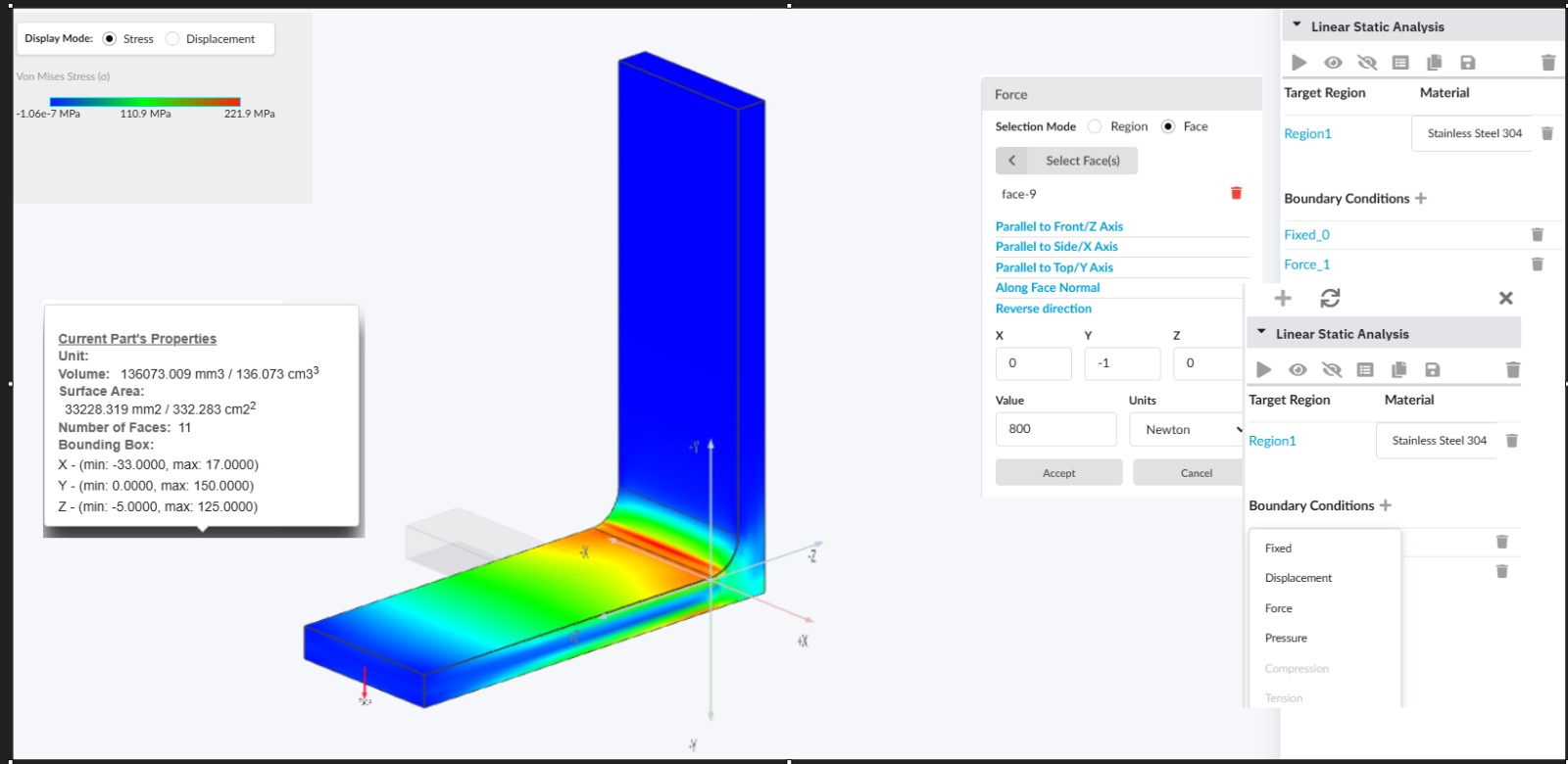
FEA stress analysis in Imaginatix

VALIDATE
EARLY

Design-time finite-element checks that surface structural problems while they are still cheap to fix — no meshing, no export, no separate tool.

Design-time FE Analysis
Run stress & deflection checks as you develop your parts — no waiting for a separate simulation phase.
Simulate directly on CAD geometry
Avoid complex meshing. Validate on the actual model without preprocessing steps.
Catch weak spots early
Identify structural problems before tooling or print time, when fixes are still cheap.
Stays inside the same model
No separate simulation export. FEA results live alongside your CAD in one workspace.

DOCUMENT & BOM

▤

BOM generation

Bill of materials generated straight from the assembly structure — always in sync.

▤

Engineering drawings

Traditional 2D documentation direct from your 3D model.

▤

Model-based definition (MBD)

Unlimited views, 3D GD&T and text annotations — the model is the document.
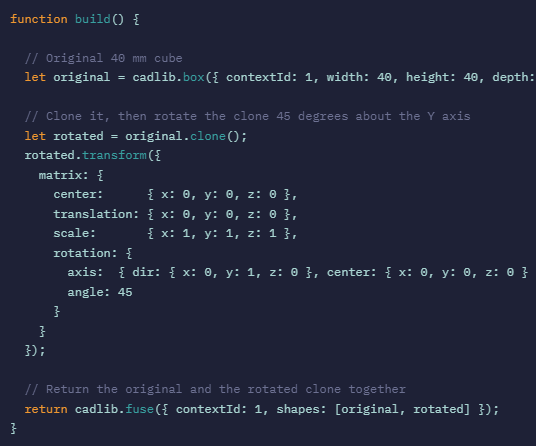
Scripted shapes example: build a box, clone it, rotate the clone 45 degrees about Y, and return both

Build a box, clone it, and rotate only the clone — returning both together to see the rotation.

</>

SCRIPTED SHAPES

Author geometry with a full-fledged JavaScript API — shapes and features as real code. Parametrize, automate and reuse: a script is a design, version-friendly and repeatable. Perfect for part families, generative logic and capturing true design intent.

Geometry as real code
Shapes and features authored through a full modelling API — version-friendly, repeatable and reviewable like any other source.
Custom parameters on every part
Declare named parameters — bore diameter, wall thickness, prong span — and they appear as ordinary fields in the part editor. Change one, the part rebuilds.
Parameters that flow down the tree
Set values at project, design or part level and let features read them, so one edit drives a whole family of parts.
JavaScript
One of the most widely used languages there is — quick to pick up, with documentation, tutorials and sample code everywhere you look. Most of what makes a good CAD script is knowing your geometry, not esoteric programming technique.
Pick geometry as you write
With the script editor open, click an edge or a face and its information is captured for you — ready to hand straight to the functions that expect it, such as fillet or chamfer.
Runs sandboxed on our servers
Scripts execute in an isolated server-side sandbox. Nothing runs on your machine, and a script cannot reach beyond the design it belongs to.
Errors you can act on
Script execution can throw errors. Use the error console to debug the issue and fix the code.
More scripting recipes →

LESS SETUP, MORE DESIGN

🖥

Design From Anywhere

Switch between office, home or client site — your models, simulations and annotations follow you across devices.

⚡

Zero Installation

Full parametric CAD, FEA and lattice tools the moment you open your browser. No downloads, no IT overhead.

🔗

Share Without Friction

Send a link, not a file. Clients and vendors view 3D models in their browser — no software required on their end.

🔒

Secure & Saved

Automatic cloud backups, access controls and storage encrypted at rest. Always available when you need them.

PAY FOR CAD
THE WAY
YOU USE IT.

⟳
Affordable base CAD. Add power when you need it

Switch on add-ons like PMI, sheet metal, PCB enclosure design, lattice design and design-time FEA for the projects that need them, and switch them off again when they don't.

☁
Maintenance Mode

Between projects, Maintenance Mode keeps your account active — your projects, models and exports stay within reach until the next job comes in.

📅
Save further with Pay per DayComing soon

For occasional use, per-day CAD and add-ons keep the budget tight while delivering the same design power.

BUILT FOR

MSME design & manufacturing teamsProduct designAdditive manufacturingLightweightingJob-shops & toolroomsConsultanciesEducators & labsStartups

PLANS & PRICING

Early-bird pricing: start free for 15 days, then lock in today's price. It stays the same as long as your subscription stays active. Turn on PMI, lattice or simulation only when you need them. Every plan has usage limits on memory, compute and session length; higher plans raise them, and you can move up or down whenever your work changes.

Lite

Coming soon
$18/mo
START

Single-user CAD with client sharing: share designs, collect feedback and let clients download. Tighter limits on memory, compute and session length keep the price low.

Basic

$30/seat/mo
START

Full CAD and every collaboration tool, with higher memory, compute and session limits for larger assemblies. Add seats for your team on one invoice.

Standard

$45/seat/mo
START

Everything in Basic with the highest usage limits, and PMI (product and manufacturing information) included.

Maintenance

$6/mo
START

Read-only: your designs stay safe and accessible but can't be edited. Move to a paid plan to edit again.

Pay per day

Coming soon
$3/day
START

Pay only on the days you design. Usage limits apply.

Need custom development? Contact support@imaginatix.com

COST-EFFECTIVE
BY DESIGN

Turn on add-ons — lattice, simulation, PMI — only when you need them, so capability scales with the work, not the budget. Pay for what you use.
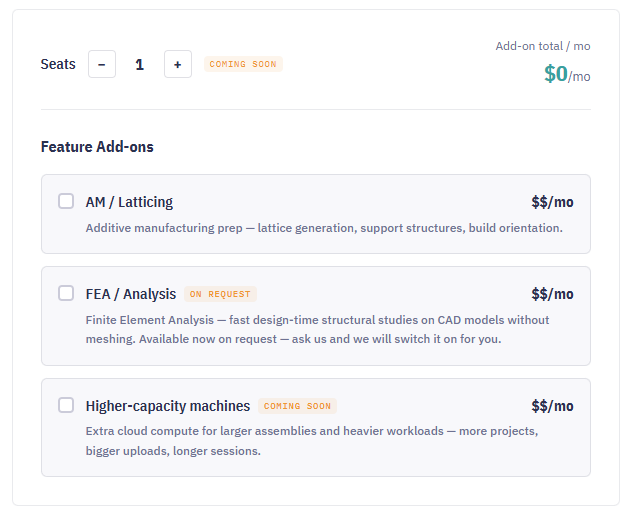
Seats and feature add-ons — AM / latticing, higher-capacity machines and FEA priced per seat per month

DESIGN WITHOUT
LIMITS

CAD, volumetric lattice and FEA in a single browser tab. Start modeling right away.

The real product, not a cut-down demo — All add-ons included. FEA on request. No credit card required.